

Tianmu Creations presents
Jeeves
Your personal assistant in the terminal — built for non-coders and coders alike. Say what you need in plain English; Jeeves does the work, carefully, and tells you what it cost.
npm install -g @tianmucreations/jeevesNeeds Node.js 22.12 or newer, and a key from an AI service — one OpenRouter key is all it takes. Then type jeeves.
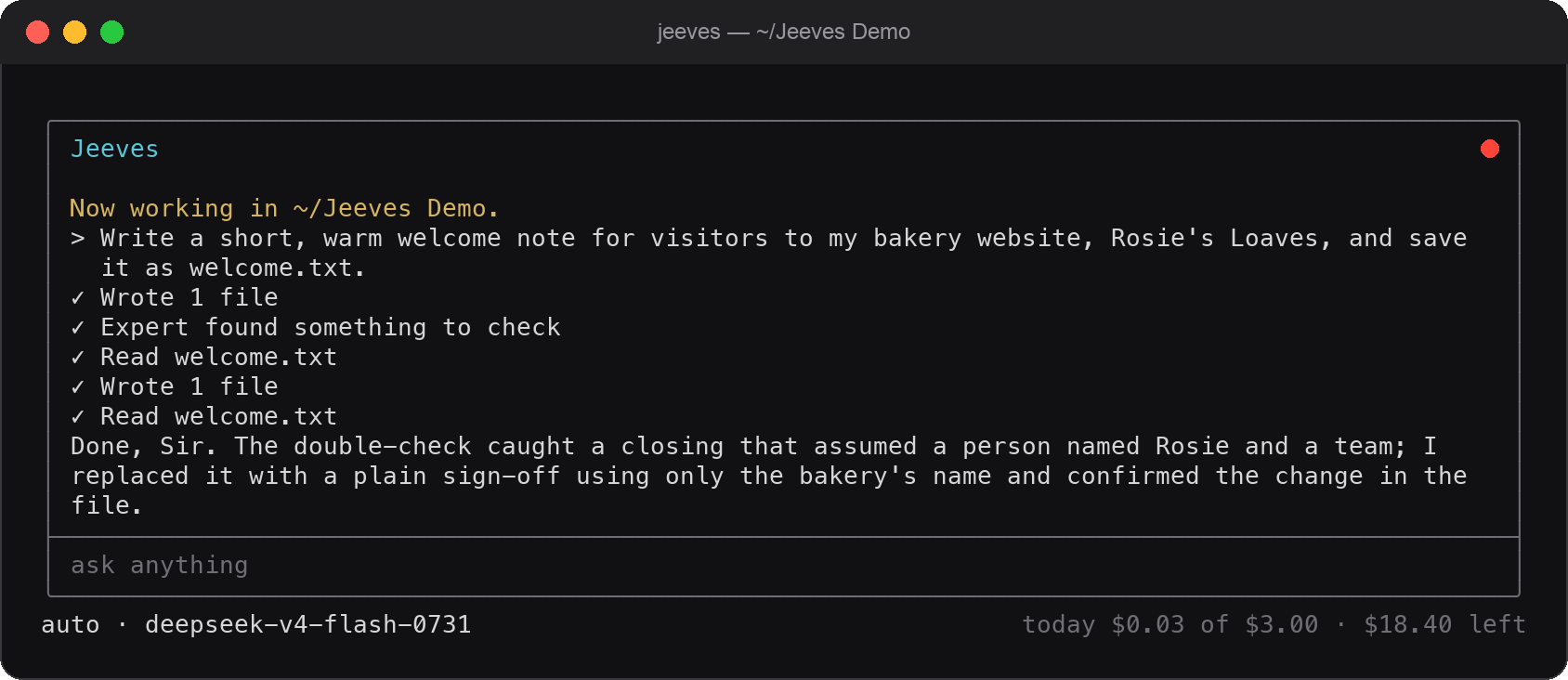
A real job, start to finish: written, double-checked by an expert model, corrected, confirmed.
What you can ask him
In your own words
- “Write a polite letter to my landlord about the broken boiler and save it as letter.txt.”
- “Tidy my Downloads folder: pictures in one place, documents in another, spreadsheets in a third.”
- “Make a one-page website for my bakery with our opening hours and prices.”
- “From hours.csv, make an invoice for my client Brightside, with a total at the bottom.”
- “Our phone number changed — update it everywhere on the website, however it's written.”
- “What's the latest version of Node.js?” — he looks it up and tells you where he found it.
Why people choose Jeeves
Careful by design
Built for people who don't code
Every screen is a list you move through with the arrow keys and Enter. Open a recent project or create a new one from a list — no typing folder locations, no jargon. Errors come in plain English, never as codes.
Auto: the right model, without thinking about it
Jeeves works with a fast, inexpensive model, calls in an expert when a job gets hard, and has the expert double-check finished programs and documents. The expert must show a concrete example of any problem, and Jeeves must see it for himself before changing anything.
He doesn't guess
Facts about the outside world are looked up on the web, read from the most official page, and given with their source. Before building something new, he checks what already exists and shows you a short research note.
Safe to say yes to
Anything that changes your computer asks first — or choose “always allow” once for a project folder. Before any change there he quietly takes a backup, so /undo puts the folder back. Changes outside it always ask, with a warning.
Type while he works
Your message box grows as you type, and anything you send while Jeeves is busy waits its turn and goes as soon as he finishes. Your own messages sit on a soft grey band, easy to find when you scroll back.
Honest about costs
A daily spending limit (you choose it; $3 to start) stops and asks before going over, and a long job checks in every 50 cents. It can cost nothing at all: free models, or models on your own computer with Ollama.
A traffic light you can see across the room
Top right of the window: pulsing green while he works, amber when he needs your OK, red when he's finished. The same status shows in the Terminal tab's title, and on a Mac a notification tells you when a long job is done.
An information bar that speaks only when it matters
Along the bottom: the model at work, what today has cost against your limit, and — with OpenRouter — what's left on your account. Warnings appear only when something needs you.
A butler, not a chatbot
Polite, unflappable and discreet, in the tradition of P.G. Wodehouse — and he calls you whatever you like. Every action is one tidy line; the model's thinking stays out of the way unless you ask for it.
Your keys stay private
Keys are kept in your computer's own secure keychain, never in a plain file.
For people who do code
Every model, every detail — when you want it
Any model, your choice
Turn Auto off and pick from 400+ models through OpenRouter, with search, favourites, prices, memory sizes and a free-models list.
Direct connections
Your own key for Anthropic, OpenAI, Google, xAI (Grok), Mistral or Groq — each company's live model list, with costs worked out from its price list. Plus any OpenAI-compatible service, Ollama, and Z.ai's GLM Coding Plan.
Built to be economical
Sticky routing on OpenRouter and cache markers on Anthropic, so long conversations cost a fraction of the fresh price. Runs your real tests and builds, and reads the results before claiming a job is done.
Where Auto is available
Only where it's proven
| Service | Auto | Everyday model + expert |
|---|---|---|
| OpenRouter | Yes | DeepSeek V4 Flash + Claude Sonnet 5 |
| OpenAI (your key) | Yes | GPT-5.6 Luna + GPT-5.6 Terra |
| Google (your key) | Yes | Gemini 3.8 Flash + Gemini 3.5 Flash |
| Anthropic, xAI, Groq, Mistral, Z.ai, Ollama, others | Not yet | Pick any model yourself |
Auto is offered only where a pairing has been measured doing everyday and difficult jobs well — our name is on every result.
Coming, if you want it
Jeeves Plus
No keys to set up and no AI accounts to create: install Jeeves and start. $9 a month, AI included — a generous monthly allowance that covers everyday use.
Leave your email and we'll tell you if and when it's ready. Nothing else, ever — see our privacy note.
Get started
Three steps
Install Node.js
Version 22.12 or newer, from nodejs.org.
Install Jeeves
Open Terminal and type
npm install -g @tianmucreations/jeevesSay hello
Type
jeeves. He'll ask how to address you, which folder to work in, and for your key — then you're away.
Everyday commands
Everything on screen
/model | Choose a service and a model (or Auto), and set your daily limit |
/keys | Add, replace or remove keys |
/undo | Put the project folder back to before your last request |
/ask | Ask before every change in this project folder again |
/clear | Start a fresh conversation |
/address | Change how Jeeves addresses you |
/help | See everything in plain English |
/exit | Leave, with your terminal exactly as it was |
Platforms: macOS is fully tried and used every day. Windows and Linux are built and tested automatically on every change; hands-on use on those machines is coming.